Omicron2.1
Publisher Description
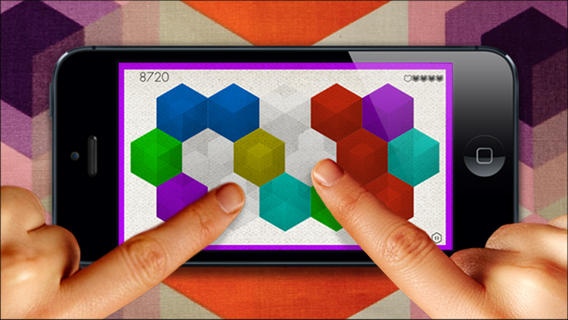
Omicron is a color reaction game for 1 or 2 players on the same device.
Eliminate tiles and earn bonus time as the difficulty increases.
Omicron offers 3 game modes, many power-ups and achievements.
A color appears at the beginning of each level.
Tap tiles while they show up in that color to win.
Discover the 3 different game types of Omicron:
- C L A S S I C -
Eliminate all of the tiles while they appear in the right color
and finish the level before you run out of time.
You lose time with each mistake you make.
You win time for every correct tap you make and
time gained is transferred to the next level .
This helps you to reach higher levels.
Speed increases level by level.
- A R C A D E -
In this mode, there are no single levels.
The rate of color changes increases
contstantly while eliminated tiles respawn.
For each mistake you make you lose one life.
Without extra life bonus the game is over after just five mistakes.
- V E R S U S -
Play Omicron with a friend on just one device!
Eliminate all tiles while they appear in the right color.
The first player with 3 points wins the match!
Omicron comes with Game Center leaderboards
and many achievements to unlock.
We appreciate your feedback!
"Ideal for parties and starting arguments." ~ AppSpy.com
"Omicron looks beautiful - all sharp edges and graduated shades and colours, like a Paul Klee painting" ~ PocketGamer.co.uk
"Simple, effective gameplay and high production values colour me impressed!" ~ KnowThyApp.com
"A slick color-based puzzler and head-to-head versus design for two players" ~ IGN.com
"It is fun to put your reflexes to the test" ~ iFanzine.com
Facebook.com/canupa
Twitter.com/canupa
Vimeo.com/canupa
Youtube.com/canupacom
Canupa.com
Requires iOS 5.1 or later. Compatible with iPhone, iPad, and iPod touch.
About Omicron
The company that develops Omicron is Nemo Holtmann. The latest version released by its developer is 2.1.
To install Omicron on your iOS device, just click the green Continue To App button above to start the installation process. The app is listed on our website since 2010-08-31 and was downloaded 2 times. We have already checked if the download link is safe, however for your own protection we recommend that you scan the downloaded app with your antivirus. Your antivirus may detect the Omicron as malware if the download link is broken.
How to install Omicron on your iOS device:
- Click on the Continue To App button on our website. This will redirect you to the App Store.
- Once the Omicron is shown in the iTunes listing of your iOS device, you can start its download and installation. Tap on the GET button to the right of the app to start downloading it.
- If you are not logged-in the iOS appstore app, you'll be prompted for your your Apple ID and/or password.
- After Omicron is downloaded, you'll see an INSTALL button to the right. Tap on it to start the actual installation of the iOS app.
- Once installation is finished you can tap on the OPEN button to start it. Its icon will also be added to your device home screen.
